Visual Schedules for Autistic Children: A How-To for Parents
On this page
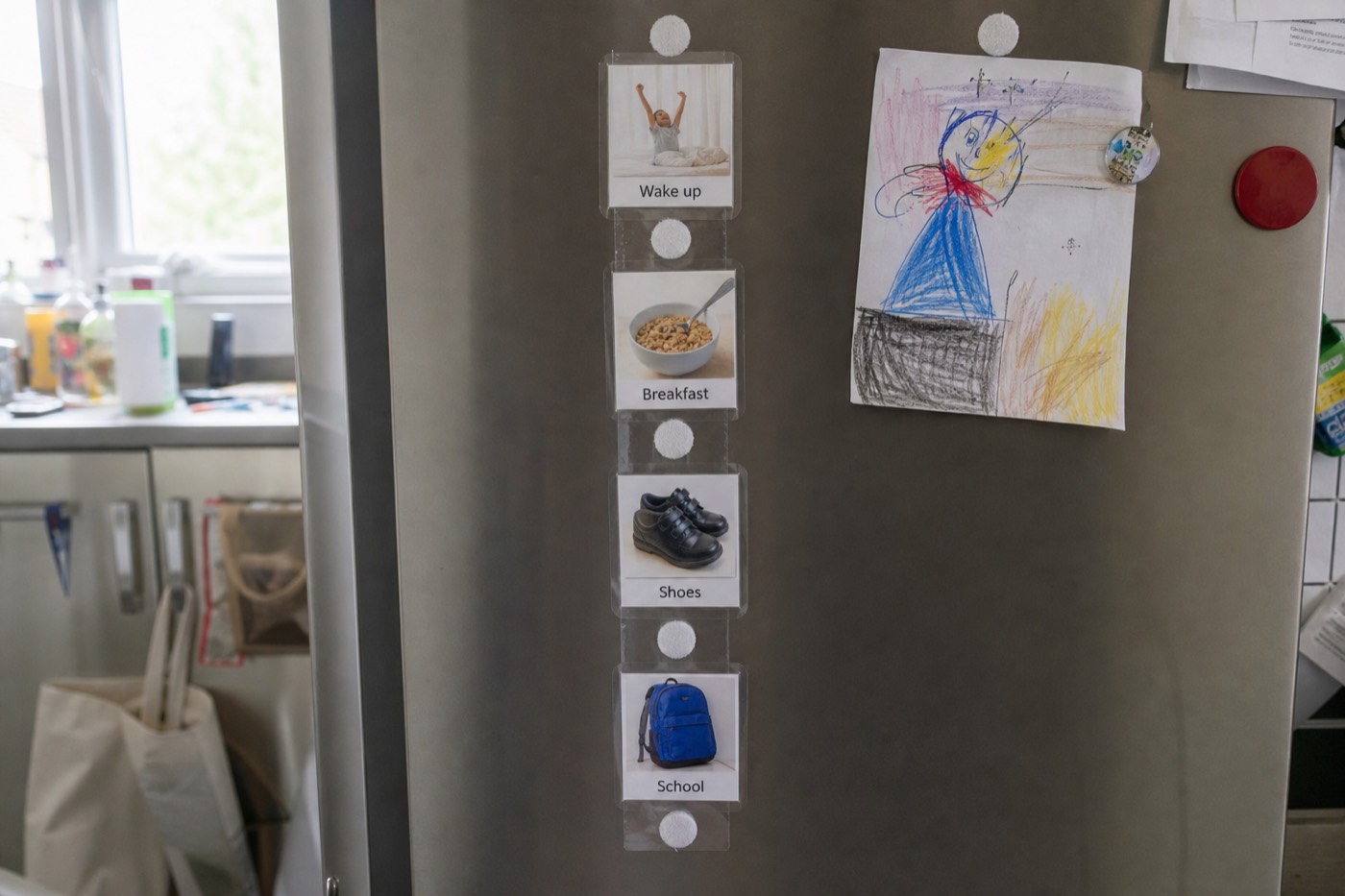
What you can do today
- Pick one tricky part of the day to start with — mornings, bedtime, or leaving the house.
- Break it into 3–6 simple steps, each with one picture.
- Try a first-then board if a full schedule feels like too much at first.
- Show your child the schedule, then physically move/remove or tick each step as you go.
- Keep it in the same place every day and use the same pictures consistently.
What is a visual schedule and why does it help?
It shows what is happening and what comes next in pictures. Predictability lowers anxiety and transition meltdowns. The smallest useful version is first-then. Use real photos of your cup and your shoes when you can — generic clip-art is a fallback.
A visual schedule is a row or column of pictures showing the steps of an activity or the shape of the day. Each picture represents one step — get dressed, breakfast, shoes, car — so your child can see what's happening rather than having to hold it all in their head or rely on spoken instructions.
Spoken words disappear the instant they're said. A picture stays put, can be checked again, and doesn't depend on your child catching and processing speech in a busy moment. That's why visuals are so powerful for many autistic children.
Why visual schedules help
Many autistic children feel safest when the world is predictable, and find unexpected change hard. Visual schedules help by:
- Reducing anxiety — your child knows what's coming
- Easing transitions — the hardest moments (stopping a fun thing, leaving the house) become predictable
- Lowering meltdowns — less uncertainty means less overwhelm (see meltdowns: what helps)
- Building independence — your child can follow steps without being told each one
- Cutting down on nagging — you point to the schedule instead of repeating yourself
They also make change easier to introduce gently: you can show a change on the schedule rather than spring it as a surprise.
Start simple: the first-then board
If a full-day schedule feels overwhelming, start with a first-then board — just two pictures: first this, then that.
- First toothbrush, then tablet
- First shoes, then park
- First homework, then snack
First-then boards are brilliant for motivation and for getting through less-preferred tasks, because your child can see the reward is coming. Put the less-preferred activity first and something your child enjoys second. Our schedule maker includes a ready first-then layout.
How to make a visual schedule
- Choose one routine to start — don't schedule the whole day at once. Mornings, bedtime, or transitions are good first targets.
- Break it into 3–6 steps. Keep it short; you can add detail later.
- Pick a picture for each step — a real photo of your child doing it, or a clear symbol. Build them in the card builder or schedule maker.
- Choose a format — top-to-bottom or left-to-right. Many children find a vertical list easiest.
- Add a "done" action — move the picture into a "finished" pocket, flip it, or tick it. Marking progress is satisfying and clear.
- Print, cut and laminate. Hook-and-loop (velcro) dots let you reuse and reorder steps. See the print-at-home guide.
Tips for making it work
- Be consistent — same pictures, same place, every day.
- Use it with your child, not at them — check it together.
- Keep language matched — say the same words as the picture labels.
- Show changes in advance — if something's different today, point to it on the schedule early.
- Don't drop it once things go well — the calm is the schedule working. Fade it only slowly, if at all.
- Make a portable version — a small strip for the bag helps with outings and appointments.
How do I make one tonight that we will still use on Friday?
Pick one sticky part of the day. Three to six steps. One picture each. Move or tick the step when it is done. Same place every day. If it is too long, it will be ignored — shorten it. Our schedule maker prints A4 or Letter at 100%.
After school, many children need a recovery strip (snack, quiet, then homework) more than a full-day timetable. Pair with meltdowns if transitions are the explosion point.
Frequently asked questions
At what age can I start a visual schedule?
There's no fixed age — many children benefit from toddlerhood onward. For very young children, start with a simple first-then board and real photos. Older children can use longer schedules or written checklists alongside pictures.
Should I use photos or symbols on the schedule?
Either works. Real photos (of your child or your home) are often easiest to understand at first; simple symbols are clear and reusable across settings. Many families mix them. Use whatever your child responds to best, and keep it consistent.
What's a first-then board?
It's the simplest visual schedule — two pictures showing what to do first and what comes next ("first shoes, then park"). It's great for motivation and for getting through less-preferred tasks because the child can see the reward coming.
My child ignores the schedule — what now?
Make it shorter, use more motivating pictures, and model checking it yourself. Move or tick steps together so it feels active, not decorative. Keep it in a consistent spot, and pair it with a first-then reward at the end. Consistency over a few weeks usually helps.
Do visual schedules make children dependent on them?
Not in a harmful way — they're a support, like a calendar is for adults. Many children need less prompting over time, and you can fade the schedule slowly if appropriate. But if it's helping your child stay calm and independent, there's no rush to remove it.
Sources and content notes
Published by Autism Parent Guide. This is general educational information.
Clinical review involvement
General practitioner (GP) — name withheld
A general practitioner (GP), who prefers to remain anonymous, has been involved in reviewing the site since its development began and as content has been added. This describes ongoing involvement in the site. Individual article review dates and the scope of each review are not currently published.
References for this guide
Content updated . This date records an editorial change, not a clinical review. Read our editorial policy or report a correction.
Keep reading & doing
Not medical advice. This article is general information, not a substitute for professional assessment. Every child is different — always talk to a qualified professional about your individual child.